
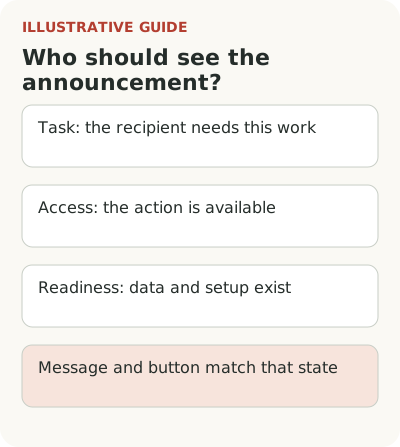
Segmenting a release audience starts with three checks: the person has the task, can access the action, and has the necessary data and setup. Match the promise and button to that state before showing the announcement. A role name or purchased plan alone doesn't guarantee readiness.
Imagine an employee training service releases automatic course assignment by job title. A department manager cares about the outcome, a learning specialist creates rules, and an administrator connects the employee directory. It's one feature, but these people are ready for different actions. “Assign courses automatically” won't suit all of them.
Which signal indicates the recipient's task?
Start with a work signal: an account regularly assigns the same courses to new employees. That's closer to a need than company size or a job title on a form. But even this signal needs checking. Repeated assignments could concern one-off mandatory certifications rather than an ongoing new-hire process.
Find out who actually does the work. In a small company a manager may run courses themselves; in a large one they may only approve them. Don't treat the role name as proof of the task. Review product actions and available customer information. If data is scarce, use a neutral invitation to learn about the workflow without promising it's already relevant to every recipient.
Start with a narrow, understandable group. The team can then explain why each person receives the message. Don't add dozens of weak signals to create an appearance of precision. A mistake in the main access condition won't disappear because an email addresses someone by name and mentions their industry.
Check the plan, release wave and role
Make a simple table of conditions. The account needs an eligible plan, an enabled release wave and a prepared directory. The person needs permission to assign courses. These conditions exist at different levels, so a general label like “customer received feature” doesn't mean every employee can open it.
LaunchDarkly's documentation describes gradual release options: a fixed percentage, expansion over time and release while monitoring selected metrics. It's an example of why code in a production environment and access for a specific audience are different things. You don't need that tool to create your matrix.
Agree with engineering on the source that determines access. A marketing list exported a week ago may be out of date. Before sending, account for a paused rollout, plan changes and removed permissions. If the list can't be refreshed, narrow the promise and link to a page that checks current status rather than directly to a restricted screen.
Connect permission, task and readiness to the message
This matrix for the hypothetical training service shows whom to include in each send. In every row the account must be in the current wave; otherwise don't send an invitation to act yet.
| Permission | Task | Readiness | Message action |
|---|---|---|---|
| Can create rules | Assign courses repeatedly | Directory connected | “Create an assignment rule” |
| Can connect data | Prepare the directory | Source not yet connected | “Check directory connection” |
| Can only view | Monitor assignments | A colleague configured the rule | “View department assignments” |
| Lacks required permission | Create a rule | Data ready | Explain how to request permission; don't invite creation |
| Has permission | No suitable recurring task | Everything prepared | Leave news in the changelog without a persistent invitation |
For the row without permission, two choices are reasonable: exclude it from the rule-creation campaign or send separate access-request instructions if that path exists. How an already opened unavailable feature appears is a separate interface decision. Segmentation determines who gets which promise.
A prepared learning specialist can create the first rule. An administrator without a directory can connect or check data. A manager without permission can learn how to request access. An account in a future wave can read the conditions and timing if those are confirmed. These messages can be short, but they aren't interchangeable.
Don't ask someone to buy a plan when the problem is a permission inside their company. Conversely, don't say “contact your administrator” if the account's plan doesn't include the capability. Both answers sound plausible until the user spends time on an unhelpful conversation. Internal confusion becomes extra work for them.
If status is unknown, an informational changelog entry with clear conditions is safer. A direct call to action needs more precise selection. This doesn't mean hiding the release from everyone else forever: fix the access information first, then expand communication using verifiable signals.
Check edge states before sending
Don't test only the ideal account. Include at least the states that change the promise: eligible plan without permission, permission without setup, readiness without an enabled wave, and a fully available workflow. The tester must follow the path in the recipient's role. An administrator session quietly bypasses the very restrictions you need to find.
Check what happens after an account switch. A user may belong to two organizations with different access, while an email often opens in the last active session. Name the organization in the message or provide a choice after sign-in. Otherwise even an accurate recipient list can send people to the wrong place.
Check delayed display too. If the rule becomes available after directory setup, an old preparation message shouldn't keep appearing. A complex automatic workflow isn't always necessary: for a first launch, manually updating a small group may suffice. But that action needs an owner and a clear time to perform it.
Find unnecessary and missed recipients
Measure how many recipients could perform the specific proposed action. For fully ready accounts, that's creating a working rule within the hiring cycle; for administrators, it's completing preparation. Don't compare the groups by the same click: their messages solve different tasks and require different effort.
Inspect the excluded audience too. Sometimes a selection rule relies on an action that the new feature makes unnecessary. Looking only for companies that often assign courses manually can miss those that abandoned the process because it was too difficult. For a small investigation, select a few accounts whose task fits but lack that event, and ask how they work today.
That conversation doesn't justify automatically adding everyone to the campaign. It tests a weak assumption in the need signal. Keep confirmed access, a presumed task and interest still to be discovered separate. Expanding the audience can then be a deliberate decision rather than the result of an overly broad formula.
Add a reverse check: who received an announcement without access, and who had access but didn't receive the necessary explanation? Those cases often hide behind an overall click rate. Investigate the cause to distinguish an outdated list from the wrong role or an incorrect destination after sign-in.
Before sending, test the promise with one representative of each state. The broader feature adoption approach connects access to a real action; if task signals are weak, segmenting first steps can help. If a ready audience still doesn't begin work, move to diagnosing non-use instead of blindly expanding the list.