
If users don't use a new feature, first distinguish missing access and a missing suitable task from lack of awareness, a failed attempt, and an unusable result. Each barrier needs its own check. Another announcement makes sense only where people could do the work but didn't notice the new method.
Suppose a purchasing service adds supplier-offer comparison. People open the email and visit the comparison page, but almost no decisions are saved. The product manager proposes another campaign. It can help in only one case: the right users haven't noticed the option. Those who reached the form and left may have a different problem.
Who could use the feature and had a suitable task?
Don't divide feature users by the entire customer base. Only employees with purchasing rights, the right plan, and at least two supplier responses can compare offers. An administrator who set up the account and no longer signs in isn't equivalent to a purchaser here. An account without active purchases isn't a candidate yet either.
Build the eligible audience for a chosen period. For the hypothetical service, these are accounts where a purchase with several offers appeared in the last four weeks and the feature is already enabled. Then count people with the required role within those accounts separately. This reveals where the team mixed permissions, need, and activity.
Save the cohort definition. If another plan gains access a week later, the overall percentage may fall simply because the audience changed. That isn't an interface deterioration. The report needs the access date, observation start, and purchasing cycle, or comparing weeks quickly becomes an argument about different numbers.
Find the barrier between access and the next task
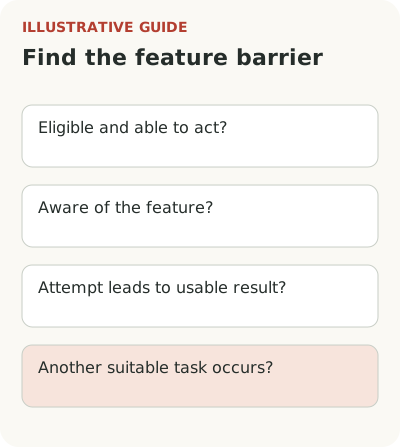
For offer comparison, fill in a map like this. It doesn't explain a cause from one event; each conclusion still needs checking against a purchaser's attempt.
| Barrier | What to observe | What to check | First team action |
|---|---|---|---|
| No access | The person cannot open comparison | Plan, role, current rollout wave | Fix access or remove the promise that they can start |
| Unaware of the method | Works with offers manually | Can they find the entry without a researcher's hint? | Test a message beside the purchase |
| Doesn't finish the attempt | Starts uploading and abandons it | File format, errors, required fields | Remove the confirmed preparation barrier |
| Doesn't get a usable result | Saves a comparison, then builds a spreadsheet | What does the approver need that is missing? | Change the result's contents |
| No next task | Doesn't use it again | Was there another purchase with several responses? | Wait for a suitable work cycle |
For the first row, examine announcement audience selection. For the last, use repeat-use measurement: the absence of a new task cannot be recorded as rejection.
Break the path into actions: the person encounters the announcement, opens comparison, adds offers, chooses an option, and saves the decision. Each transition needs its own hypothesis. If a purchaser works with offers but doesn't open comparison, check entry placement and the clarity of its promise. If they start and abandon after uploading a file, study data format, errors, and manual work.
Showing a message doesn't prove someone read it. An open page doesn't prove they understood its purpose. Supplement events with observation: ask a purchaser to do a real task and watch where they look for the next step. Don't immediately offer hints. Otherwise you'll test your own ability to explain.
Look at successful attempts separately. Perhaps employees with ready templates use the feature while everyone else must first standardize data. The problem then sits before the first event inside the feature. A more visible button will attract more people to the same unprepared form and improve only the attractive top-line chart.
How can you tell whether first use solved the task?
Successfully saving a comparison is a completed action, not yet value. A purchaser may still need a spreadsheet because the manager decides using a different set of fields. The feature works technically, while the team continues the job outside the service. Find this out before launching new guidance.
In the Choice story, Evgeny Belov describes a similar metric interpretation error: the team saw visits to a benefits service, but employees didn't complete their selection. The investigation led to the assortment, comparison complexity, and unclear budget rules. This is one team's experience, not proof that every weak release needs redesign. It shows what questions a visit count hides.
For purchasing, a useful result might be a decision the employee sends to an approver without rebuilding it in a spreadsheet. Check it through a combination of events and conversation. If the handoff occurred, ask whether the manager accepted the material. A file's existence alone doesn't make the work useful.
Whom should you invite to review a stalled attempt?
Don't assemble one group of “inactive users.” Someone who missed an announcement, someone with an import error, and someone who returned to Excel will describe different problems. Choose representatives of each state. A few conversations can uncover explanations but cannot estimate their share across the customer base.
Ask them to reconstruct their last purchase: what needed deciding, which documents were available, and who needed the result. “Why don't you use our new feature?” imposes the original frame. The person may not consider its absence a problem at all, and that answer is useful for deciding on further investment.
Record observation separately from interpretation. “Didn't add the third supplier because the field accepts only one file” is an observed barrier. “Lacks motivation” is still a guess. For each guess, specify evidence that would disprove it. This simple step keeps the investigation from becoming another debate about copy preferences.
How should you choose a fix and measurement window?
If awareness is the obstacle, test a contextual message beside the purchase. If setup is the obstacle, reduce data preparation or explain it before starting. If the result doesn't suit the approver, revise the comparison's contents. These actions aren't interchangeable: a tour won't add a needed field, and a new import feature won't announce itself.
Before drawing conclusions, check the events themselves. A form change may have stopped recording saves, while a repeated click may create several records of one action. Compare several known attempts with the log and working objects. If the data doesn't reflect reality, fix observation first. Otherwise the team will treat behavior that exists only in the report.
Don't combine all fixes in one large release. Simplify import, rewrite the announcement, and change the audience at once, and you'll see an overall shift without knowing each action's contribution. That can be acceptable for an urgent fix. Just don't turn the observation into a confident causal explanation, and keep the change list for the next review.
Before the change, record the expected shift. For example, purchasers with a suitable task complete comparisons more often during the current purchasing cycle, without more incorrect decisions or import-related support requests. Compare equally mature groups with access. Without a control group, call it a change after the fix, without a confident causal conclusion.
Diagnose one release before another campaign. The general path from announcement to feature use helps assemble the stages, and the launch plan with owners assigns work after the failure is found. The investigation card should retain the specific barrier, test, and person able to remove it.