
Feature adoption rate is the share of eligible users or accounts that achieved a defined outcome with a feature within a chosen window. Define the eligible audience first, then count first use and repeat use in the next suitable work cycle separately.
Imagine a property management service adds bulk export of completion certificates. Accountants on a particular plan can use it when the account already has completed work. Building residents and employees without export permission can't do anything with it. Including them in the denominator simply because they sign in answers a different question from the outset.
Formula and an illustrative account calculation
The general formula for a chosen window is eligible units with confirmed useful use / eligible units × 100%. The unit below is an account, and eligibility is defined before the action.
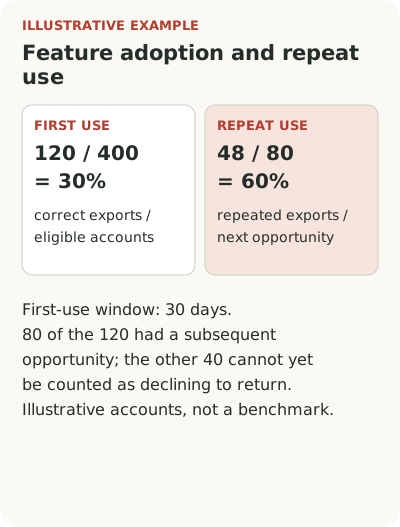
Suppose there are 1,000 accounts in total; 400 have the plan, permissions and completed work at the start of a 30-day window. Of those 400, 120 produce a correct export. Feature penetration is 120 / 400 = 30%, not 120 / 1,000 = 12%: the latter answers a different question about the entire base. Of the 120 that tried it, 80 reach the next period close and receive new documents; 48 of those 80 export again. Repeat use among accounts with a subsequent opportunity is 48 / 80 = 60%. The other 40 cannot yet be counted as having declined to return.
Choose the window to fit the customer's process, and check that the archive was successfully generated rather than counting a button click. These figures illustrate the calculation; they aren't an industry benchmark.
The eligible audience exists before the click
Define eligibility using facts independent of feature use: plan, role, enabled capability and required data. Record when those conditions are met. An accountant who gains access at the end of a month hasn't had the same time to learn as a colleague with access from day one.
Don't define eligibility as “visited the export page.” The visit already depends on whether the feature was noticed. That denominator excludes people who could benefit but didn't find the section. They are a distinct group, and losing them from the calculation is particularly costly: they may be the people who need a launch message.
Account and person data need separate identifiers. The Segment Group specification describes linking a user to an organization and allows one user to belong to multiple groups. This isn't a requirement to use Segment. It illustrates why an employee's email and company name don't replace an explicit link between an event and the right account.
The role of the metric in a launch is discussed in the feature adoption guide.
Repeat use must fit the work cycle
Bulk certificate export is needed when a period closes. Repeating it a week later may mean nothing if the accountant prepares certificates monthly. Choose the next suitable period and count return among accounts for which it has already arrived and new documents exist.
For a daily planner, the condition would differ. Use on separate working days might distinguish a trial from sustained work. A universal “two clicks in thirty days” is appealingly simple, but it doesn't know how the customer works. Derive frequency from the task, not someone else's reporting template.
Keep the count of one-time users too. They aren't necessarily disappointed: someone may have completed a rare task and no longer needed the feature. Ask whether a repeat need arose. Without that question, a missing event can easily be mistaken for missing value even when the product did everything required.
The choice of message format depends on the feature use scenario.
Don't quietly change the comparison base
Suppose the export is opened to another plan. The number of users rises but the percentage falls because the eligible audience grew faster. That doesn't prove the feature got worse. Mark the access change in the report and compare the original audience separately from the new one.
The same applies to roles and data. If a bulk document upload sharply increases the number of eligible accounts, the new denominator changes the percentage even if accountants behave just as before. Keep definition versions and a history of material conditions. Don't silently substitute today's plan for last month's: that creates a history the product never had.
Account for time since first access. Comparing established accountants who have known the service for two years with new users by calendar month is convenient, but launch assessment also needs a view at the same cohort age. It shows how long passed before the first working operation.
Define what account-level use means separately. If one accountant exports for an entire property management company, the share of active seats will be low even when the required process is fully covered. The number of eligible accounts with a correct export and the distribution across required roles are more useful here. In a collaborative editor, by contrast, use by one person may not reflect team value. The feature determines the level. A report can keep both views, but it cannot combine user and account percentages into one measure without a clear meaning.
For what to show a leader, see the dashboard guide.
Turn a gap into a specific check
If access exists but awareness is rare, check the message's location and recipient. A mass email to every resident is unlikely to help. If people notice the message but don't create an archive, investigate document preparation, permissions and errors. If the first operation succeeds but the expected repeat doesn't happen, ask about the next task and the quality of the result.
Don't try to fix every gap with a tour. One may need a changelog entry, another a tooltip beside the period selector, and a third a change to the export itself. Choose the tool after finding the cause. Otherwise, the activity chart can grow through extra openings while the work stays the same.
Start with one feature and record its definition in six lines: unit, access conditions, window start, useful outcome, repeat rule and limitations. Then recalculate the current percentage against that description. If it changes substantially, explain the changed calculation to the team before setting a target for the next launch.