
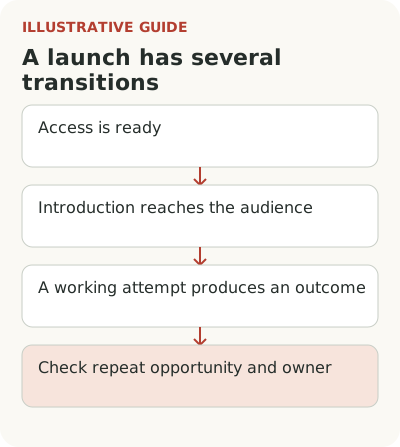
A SaaS feature launch checklist should confirm that each transition is ready: access, introduction, a working attempt, an outcome and repeat use. Give each item an owner, evidence and a stopping condition. Sending an announcement completes only one part of the plan; it doesn't confirm that a customer can do the promised work.
Imagine an agency service launches approval of materials with an external client. The team expects managers to stop collecting revisions across several conversations. Counting sent invitations won't test that expectation. The team needs to see the client open the material and leave a usable comment, the manager make a decision using it, and then choose the same approval method again.
Fill in the checklist with an owner and evidence
This working template is for material approval. The team adds owner names and evidence links to its own card; “done” follows verification, not merely the assignment of an owner.
| Transition | Responsible role | What to confirm before marking done | When to stop |
|---|---|---|---|
| Open access | PM and engineering | A manager can invite a guest only to the selected project; the guest cannot access another project | Access boundary failure |
| Explain the change | PMM | Copy and destination tested as the recipient | Promise leads to a restricted screen |
| Start approval | PM | Invitation delivered and the right version opens | Emails are lost or lead to the wrong material |
| Prepare help | Support lead | Limitations card and escalation path available to the shift | The team doesn't know who handles a blocker |
| Get an outcome | PM and CS | Client leaves usable revisions and manager uses them to decide | Revisions are lost or visible to outsiders |
| Check repeat | PM and analyst | A new eligible item and chosen approval method are recorded | No data on another task yet: defer the conclusion |
For unknown conditions, run a limited beta first. The support, CS and sales readiness card covers a separate row in this table and holds details that don't need repeating throughout the plan.
Define an eligible account before the announcement. In the hypothetical service, it needs the enabled feature, a project with material to approve and an employee allowed to invite external participants. If the content author lacks that permission, “send it to your client” doesn't create a start. It creates a support request or a conversation with an administrator.
Record a preparation path for each missing condition. Not every customer needs to complete it in advance. The team must avoid confusing preparation with first use. Connecting a domain, granting permission and uploading material can take different amounts of time and depend on different people.
Assign someone authority to stop the launch. If invitations aren't delivered or external access works incorrectly, someone must pause audience expansion. LaunchDarkly distinguishes gradual releases from experiments: the first controls feature access, while the second compares variants using metrics. Don't call every phased release an experiment without the appropriate comparison design.
Introduction: where will the eligible audience find the invitation?
Displaying a banner, reading a news item and understanding a new way of working are different events. In practice, the first is often the only one you can measure with confidence. Retain that limitation in the report. The useful question is: what share of the eligible audience encountered the invitation in a suitable place within the chosen window?
For the agency manager, that place might be the finished material screen. They're already thinking about sending work to the client. A general announcement at sign-in is also reasonable if it explains the change in advance, but it shouldn't carry the entire training task. After the news is closed, an entry point should remain beside the action.
The message owner needs a lifetime for the copy. Once most eligible accounts have tried approval, continuing the first introduction to everyone makes little sense. For a new employee at an existing customer, however, the capability is still new. The release date alone doesn't determine who needs the explanation.
Attempt: what counts as starting approval?
Opening the invitation window is easy. For a working attempt, the manager must select material, specify an external participant and send an invitation with the right permissions. This is often where a polished demo meets ordinary constraints: the client mustn't see other projects, and the manager needs an approval deadline.
Define the start event so it reflects intent to do the task. In the hypothetical example, it's sending an invitation to a specific item, not viewing the feature page. Record failure reasons too: an address error, insufficient permissions or confusing access settings. A single form-completion rate won't explain them.
Don't increase starts by hiding conditions. If the external participant needs to register, say so before sending. Otherwise invitations may rise without more normal approvals. The early metric improves by giving the customer unexpected work.
Outcome: what must both sides complete?
In a collaborative workflow, one user doesn't control the whole path. The manager has sent material, but the client hasn't replied yet. Counting the attempt as a failure tomorrow would confuse a normal approval period with a defect. Choose a window based on the actual process and separate waiting for a response from delivery or access errors.
Define the useful outcome in advance: the manager receives comments on the correct version and can make a decision without transferring revisions from a conversation. Some of this can be checked through events, some through conversation or observation. “I'll look later” is technically a comment, but it doesn't yet solve the approval task.
An Appcues and Navattic survey discusses a gap between development pace and launch support. The authors surveyed 60 marketers; that sample cannot be generalized to the whole market. For the agency service team, it is a prompt to assign an owner to work after the announcement, not a conversion benchmark.
Repeat: what to check on the next item
Another session in the service doesn't mean another approval. The manager might have signed in for an invoice. You need a subsequent item that genuinely required external review and a choice of the new method in that situation. The unit of analysis can be an account or a project, but don't change it mid-report to get a convenient percentage.
Compare reasons for returning and not returning. A customer may have finished a one-off project, so no repeat doesn't always mean disappointment. Another may have returned to messaging because guest access was limited. Only the second case directly identifies a feature barrier. Identifying eligible repeat opportunities makes the conclusion more useful.
The plan should allow a decision to stop investing in the workflow. If ready accounts understand the feature and use it without errors but the result doesn't replace familiar work, another reminder may change nothing. Define in advance when the team will revisit the original task, not just the message. That's more useful than promising to increase every usage metric forever.
That decision needs qualitative reasons alongside numbers. Several completed approvals can mean different things: one customer tested sample material, another ran a real project, and a third stopped after the client's response. Don't collapse them into identical success events without context. Keep the working-outcome criterion and apply it consistently to all observed groups.
Collect readiness evidence for each row and set a date to check the next work cycle. Use the broader path from announcement to use as the basis for stages. If launch has already happened but work hasn't started, investigate the specific barrier and return it to the checklist owner.