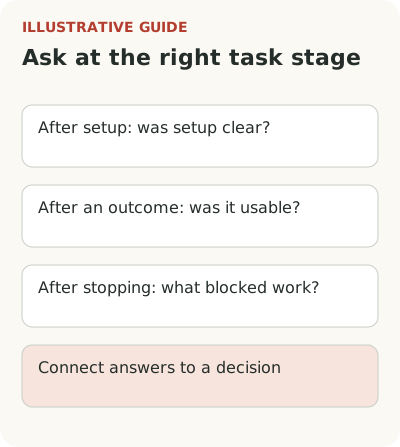
Tie a survey after feature use to a specific task: what the person tried to do, what happened, and where difficulty remained. Immediately after setup, ask about setup; after an outcome, ask whether it was usable. Those moments produce different answers. Study people who stopped separately: a survey shown only after success won't hear them.
Start with the decision the answers should support. Does the team want to know what to improve, whether to expand a launch, or why users returned to the old method? That determines the question, audience, and placement. A generic product-rating pop-up rarely answers all three.
If you first need to define feature adoption, start with the path from announcement to application. A survey supplements observation of that path; it doesn't replace it.
What should a feature survey help decide?
Suppose an analytics service introduces scheduled report exports. At launch, the team wants to check whether users understand recipient setup. It needs a question about that part of the scenario, not overall platform satisfaction. Answers should help decide what to change in the form and guidance.
Later a different question arises: does scheduling replace manual export? Talk to people who received at least one report and encountered the task again. Immediately after saving settings, they can't yet assess the outcome. They can say what remained unclear while creating the schedule.
Write in advance what the team will do with different answers. If people don't understand the recipient list, check labels and an example email. If delivery time doesn't suit them, investigate schedule settings. If the team doesn't know what it will do with the answers, narrow the research question first. Don't pass that work to the respondent.
When to show an in-product survey
Jamie Curtis of FT describes how the team moved a survey from settings closer to the main FT Edit experience. The invitation appeared infrequently and could be dismissed. The useful practice is choosing placement based on where users spend time while preserving their ability to continue.
For the hypothetical export, a successful schedule-creation screen may be suitable if the question concerns setup. Assessing the delivered report needs another signal and time. Don't put a question over a completed form before saving: the person may lose their train of thought, and the team will get a reaction to the interruption.
You don't need to stop everyone on every visit. Set invitation frequency, account for previous responses, and allow dismissal. If an announcement, tour, and survey run together, coordinate their order. Otherwise the feature introduction begins by asking users for yet more attention.
Questions after setup, outcome, and abandonment
For the hypothetical scheduled report, questions can differ:
| Moment | What to ask | What is too early to conclude |
|---|---|---|
| Schedule saved | “Is anything still unclear about who will receive the report and when?” | That delivery and content have already proved useful |
| First report received and opened | “Were you able to use this report for your task? What did you have to change?” | That the feature is needed daily |
| Setup canceled | “What stopped you from finishing setup now?” | That every cancellation means dissatisfaction |
| Person returned to manual sending | “Why did you send the report manually this time?” | That the new method is worse for every customer |
These are example questions, not research findings. Show them so a person can decline and continue working. If you need the entire early launch process, use a feature beta testing plan, not one survey in place of a beta.
“How much did you like our innovative feature?” suggests the desired tone and offers little material for product changes. Tie the question to experience instead: could they set up delivery to the right people, and what did they have to work out separately? Add a short explanation field if the team is ready to read the answers.
The exact wording depends on timing. After an error, don't ask how easy it was to complete setup. After a first introduction, don't ask for a long-term value assessment. The product already knows part of the state; use it to avoid an absurd question.
Preserve the original meaning of open answers. “I didn't understand who would get the email” contains a specific uncertainty. Turn it into a generic “bad UX” tag and the detail disappears. Record the step, expectation, and outcome before grouping similar cases. The user's wording may also suggest future guidance copy.
For that, see writing tooltips in customers' words: an answer is valuable with its situation, not as a ready-made slogan.
Who is missing if you ask only after success?
A survey after task completion selects people who managed to complete it by design. They matter, but don't represent the entire eligible audience. Those who left while choosing recipients may have encountered another difficulty. Their absence from responses doesn't mean there are no problems.
They need a separate route: an invitation when returning to unfinished setup, outreach through an established communication channel, or a research session. Choose with consent and the customer's usual communication in mind. In reporting, don't combine post-success answers and reasons for non-completion into one satisfaction percentage.
Separate roles too. An administrator set up the schedule, while a manager reads the report. The first can assess the form; the second, the content's usefulness. A general value question without role or situation produces a vague picture. This is especially visible in B2B when the buyer and daily user are different people.
Keep selection conditions alongside answers: who was eligible for an invitation, who saw it, who responded, and at what stage. Unanswered invitations are part of the picture too. If mostly established users respond, don't generalize their ratings to newcomers. Nonresponse means neither dissatisfaction nor agreement: reasons remain unknown until studied.
With low traffic, don't turn a few answers into a precise percentage for the customer base. Alternatives are covered in low-traffic onboarding research.
For a first review, a simple record per case is enough: role, task, step, answer text, and decision. Don't copy unnecessary customer data into a shared table. The circumstances of the difficulty matter. When an idea for change appears, keep its link to the original observations so the team can later check which problem it meant to solve.
Connect feedback to a team decision
In the monday.com CRM team's account, early-user feedback was collected so engineers, product, and other team members could see it. Some discussions continued in user meetings. That's a process example, not a basis for expecting the same response from every beta.
Start with a short review: where the person was, what they tried to do, what question arose, and what will change in the product. Store observation and your hypothesis about its cause separately. Several similar answers are a reason to check the scenario. They don't establish the size of the problem across the whole base.
After a change, return to the original task: is it clearer who will receive the report, and could the user set the right recipients? The number of survey answers is secondary. Choose one new feature, one team decision, and one moment to ask. Feedback can then affect work rather than only adding comments to a table.