
Onboarding invited users begins with the context in the email and ends with their first working task. Preserve who invited them, which workspace they are joining, their permissions, and what they need to do. After sign-in, take them to that task, not to creating another organization and importing data again.
Plan the invitation's full lifecycle: sending, acceptance, wrong address, expired link, missing permissions, and work that is already complete. A sent email isn't an accepted invitation, and acceptance doesn't confirm a useful action.
Prepare the task before sending an invitation
Suppose an approver receives an invitation to an expense service. They didn't choose the product and haven't seen a demo. Their job is to review a request, not set up a company. Before sending, the requester should create a usable request, check the address, and select an allowed role. Otherwise the email leads to a task without materials or authority.
Separate workspace-owner readiness from invitee readiness. The owner connects reference data; the invitee receives context and makes a decision. If both see the same wizard after sign-in, check whether the second participant creates an unnecessary workspace and loses the original request.
In Participation Studio's B2B onboarding project, one person evaluated the service while its value depended on a team. Researchers found an unsupported transition to collaborative review. This is a specific published experience that suggests a question: does your product provide a clear transition from individual evaluation to real work by several people?
Explain context and access in the email
For the hypothetical approver, an invitation to review a specific request is more useful than an abstract “Join the workspace.” Before sign-in, they should understand who invited them, what they need to do, and what information they will see. After sign-in the product should preserve the link to that task. There is no reason to send them through a general overview of every module.
Show the requester whom to invite and why. In some companies the approver is a manager; in others it is a financial controller. Don't assign a role from a questionnaire job title without checking account rules. A mistaken invitation can expose data to the wrong person or hold up the process while waiting for an unsuitable participant.
B2B SaaS team onboarding covers handoffs more broadly. In an invitation, distinguish viewing, commenting, and approval rights if the product distinguishes them. Explain access before sending. A quick entry shouldn't expand authority for a convenient demo. An invitation concerns responsibility as well as team growth, so it can't be reduced to a polished email field.
Handle invitation states and transitions
An email may not arrive, a link may expire, or someone may sign in with another address. The requester needs clear states: sent, accepted, action pending. Don't show “Team ready” when the system only knows the email was sent. Sending is a separate event, not proof of collaboration.
A hypothetical state map for an invited approver:
| State | What the invitee sees | Next step and check |
|---|---|---|
| Sent, person hasn't signed in | Sender, organization, invitation purpose, and permitted context | Sign in or register while retaining the target request |
| Signed in with a different address | A clear explanation of the mismatch | Switch accounts or request a correction; don't automatically grant access to another address |
| Invitation accepted | Workspace, role, and linked request | Open the task without repeating the owner's setup |
| Link expired or revoked | The exact reason it is unavailable without revealing restricted data | Request a new invitation if permitted |
| Accepted but no decision rights | Available actions and an explanation of the restriction | Contact the authority owner; don't offer an approval that is known to be unavailable |
| Task already complete | Outcome within permitted access | Read the result or move to other available work; stop reminders for the old task |
Example email meaning: “Anna invites you to the purchasing workspace to review a request. After sign-in, the request itself will open.” Include names and details only to the extent permitted in email. Test the promised transition after sign-in with both new and existing accounts.
Allow safe address correction, resending, and access revocation. Explain what happens to the old link. If the invitee already belongs to another organization, explain workspace selection and preserve the target request. Losing context after sign-in can turn a successful email click into another unfinished start.
If an invitee stops after sign-in, use return to saved setup based on confirmed state. Don't send reminders forever. Stop them after acceptance, revocation, task completion, or an explicit refusal. The participant may already have resolved the issue another way. An automatic “A colleague is waiting” email without a state check adds noise and can create a false sense of lateness. Define message conditions as precisely as invitation conditions.
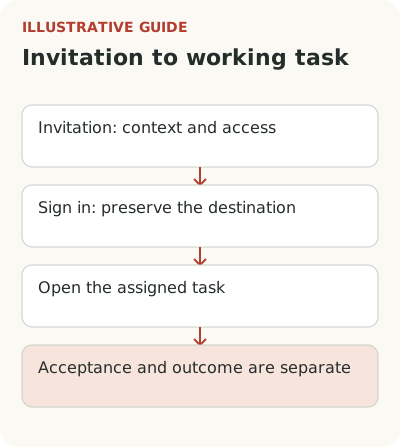
Bring the invitee to their first action
An approver arrives at a different time with different starting data. They don't need to create an organization or import reference data. They need the request, expense justification, available decisions, and consequences of approval. This is a separate path by job and state, not a new name in the owner's welcome message. Put help around those actions. Administrator training is more than unnecessary here: it can hide the request itself.
If the invitee lacks authority, explain that before an approval attempt and provide a route to the access owner. If the request is already closed, show the outcome and available next actions. The email link must work correctly in a changed state too. The user shouldn't have to arrive before the requester changes the document.
Test the full cycle with two different people. One creates a request, the other receives an invitation, signs in, and decides; the first sees the result. A single employee using several test addresses is useful technically but doesn't show whether a new participant has enough context. Their questions reveal gaps the journey's author has stopped noticing.
Separate invitation acceptance from the result
The main measure could be the share of eligible new accounts in which a real request receives a decision from another participant within the chosen window. Count sending, invitation acceptance, and the invitee's first action separately. Account activation rules help combine participants' actions without requiring the same event from everyone. This shows whether the handoff stopped at delivery, sign-in, task understanding, or authority.
Don't turn an arbitrary number of active participants into a universal standard. Two people may suffice for an approval; other work needs a different structure. PostHog's retention documentation supports analysis of groups, including organizations and accounts. This unit is useful where the result combines actions by different users.
When comparing windows, account for working days and task frequency. An invitation on Friday evening and one on Tuesday morning allow different time for a response even with the same calendar difference. Separately examine teams still exploring the product and those arriving with a ready request. Their readiness for collaboration differs before the interface enters the picture.
Check that an improved invitation doesn't bring more incidental participants who do no further work. Success is a completed process the team can repeat in ordinary work. Look at the next approval after the first: does the team complete it independently or return to support each time? This helps distinguish successful one-time assistance from a learned way of working.
Use one safe test invitation that represents a real task. Follow it as a new user and as an existing member of another workspace, then check an expired link and an already closed task. Only then decide where a checklist or tooltip is appropriate. An email field alone doesn't activate a team.