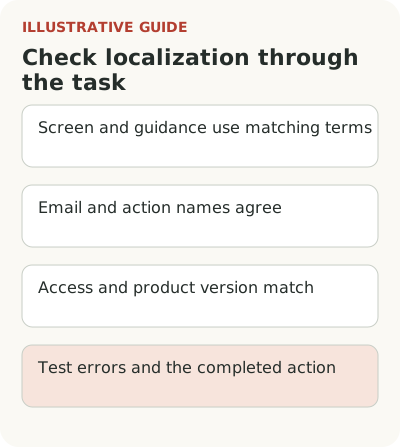
Localizing onboarding means checking language and meaning across the whole path to a first outcome: screens, tooltips, emails, errors, and action names. Translating individual strings isn't enough. Users must find the right element in their product version, understand the instruction, and perform an action available to them.
Check localized onboarding as a working scenario: language, names, action availability, and product state must agree. Reviewing one translation file won't show that. Start with the task someone should finish in the chosen language version.
For a multi-user service, use the team journey in B2B onboarding as a starting point. An administrator and an invited employee enter at different times, so check language on both paths.
Keep interface and guidance terminology consistent
Suppose a reporting service uses the English word “workspace.” In the Russian interface the team chooses a term meaning “project,” the email keeps “work area,” and the tour says “space.” Each can be explained separately. In one scenario, they create three names for one thing.
Make a short list of concepts on the first path: work object, participant, role, action, and outcome. For each, record the interface name and an acceptable explanation. The editor, designer, and support team need this list. It's a small working glossary, not a reason to start a separate yearlong project.
Microsoft's guidance on global communications offers a useful principle: use one word for one concept consistently throughout the material. The source concerns clear writing and translation; it doesn't promise conversion growth. In onboarding, the principle helps people recognize the same object across steps.
Which onboarding elements should be localized together?
A hypothetical user creates a project, invites a colleague, and sends them a report. The path includes more than a tour: a form, system email, error, confirmation, documentation, and possibly a support answer. If only the welcome is translated, the remaining work stays in another language.
Walk through the scenario end to end with a clean test account. Don't rely on a team member's saved language. Check what an invited colleague who hasn't chosen settings sees and what happens after following the email link. The starting conditions differ.
Also agree where language comes from: the user's choice, workspace, or browser settings. That's a product decision. If someone explicitly chose one option, an unexpected switch to another needs explanation. Don't invent separate rules only for tooltips: they should match the main interface.
Language and the user's task are different attributes. Don't substitute a role-specific branch for translation: onboarding segmentation belongs where work or starting state actually changes.
Give translators context for short strings
The isolated string “Apply” might mean apply a filter, submit an application, or confirm settings. Without a screen, the translator guesses the meaning. Provide the string's purpose, state, and neighboring elements. Context is especially useful for short labels: the text itself explains very little.
In the hypothetical report, “publish” is inappropriate if a button only saves a private draft. That translation changes the user's expectation and may stop them before a safe action. The opposite error occurs too: a neutral “done” hides sending the report to all participants. In that case, name the consequence explicitly.
Keep important terms where accuracy would otherwise suffer. Localization should help people act, not translate every English word at any cost. If an audience commonly uses a borrowed term for “workspace,” you can test it. But it should match the product and be supported by user understanding, not just the team's taste.
Examples of source wording and checks appear in interface tooltip copy. Translate an instruction that is already clear; otherwise the team gets the same ambiguity in several languages.
Check content against the product version available
A language version may coincide with a different feature set, but language doesn't automatically determine it. Actual conditions matter: plan, role, service region, and enabled features. Don't substitute one for another. An English interface doesn't tell you what permissions a particular employee has.
Before showing an instruction, check that the action exists for that audience. If a tour offers to connect a source unavailable in the selected version, an accurate translation of its name won't help. The person still can't finish. That needs another scenario or a clear explanation of the limitation.
The same applies to images and examples. A screenshot of an old English form may contradict a new Russian screen. Currency amounts, dates, and file formats in examples should help complete the task and match actual service requirements. Don't change them mechanically to look local if the product accepts another format.
Check error messages too. A hypothetical user uploads a table with a decimal comma while the service expects a point. If that is the cause, the explanation should name the accepted value and how to correct it. A generic invalid-file message makes them try possibilities. If the format could be accepted automatically, discuss fixing import: localization doesn't have to make someone manually do work the product can do itself. Until behavior changes, instructions must honestly describe the current rule.
Localized onboarding checklist
For one language and one task, write down a short walkthrough. Each item needs an observable outcome.
| Check | What should match |
|---|---|
| First sign-in and email link | The person reaches the agreed language version |
| Object and command names | One object has the same name on screen, in the tour, and in documentation |
| Action availability | The step exists for the selected role, plan, and account state |
| Form error | A message in the right language names the cause and available correction |
| Long text and user values | Wrapping doesn't hide the condition, field, or buttons |
| Return after a pause | Language and saved resume point remain consistent |
This checklist tests a scenario, not the quality of every company translation. For narrow screens and keyboard use, add an accessible product tour check.
Translation can take more space. A button label may be cut off, a tooltip may cover the required field, and wrapping may make a key condition hard to see. Check at the window size the user actually uses. A table of strings won't reveal those errors.
Check long values entered by the user too.
Give a native speaker a specific task and test data. Watch whether they find the action without team explanations. Afterward, ask where they hesitated and which names they understood differently. Fix the connection between text and action. A general “the translation is good” rating is too broad.
In analytics, separate language from other audience differences. Lower activation in one version may relate to acquisition channel, role mix, or integration availability. Don't attribute the difference to translation just because the report is grouped by language. Start by checking the specific point of loss and supplement numbers with observation.
For the first pass, choose one language and one path from sign-in to a useful outcome. Check names, emails, access conditions, and tooltip appearance. After the next release, repeat checks for affected steps. Localized onboarding remains part of the product and needs to change with it.