
Onboarding analytics events should distinguish access, guidance display, attempts, and confirmed work outcomes. A collection plan defines the unit of measurement, properties, event source, and rules for handling repeated delivery.
Suppose a procurement service launches request approvals. A new customer must configure a route, submit a request, and receive an approver's decision. An existing customer has gained the ability to approve several requests at once. These scenarios need a shared foundation, but the signs of first use and launch outcomes differ.
A working tracking plan for request approval
For the hypothetical B2B service, the outcome unit is an account; different people may participate. In each event, retain the time, account_id, user_id when available, an operation ID for operation-related events, a unique event_id, and schema version. Agree on the source and access rules with the team before collection.
| Event | Confirmation | Required context | Duplicate check |
|---|---|---|---|
eligibility_granted | Access and task conditions confirmed | Account, time, conditions version | One grant fact per state change |
help_shown | Interface actually displayed guidance | Account, user, guidance version | One event_id on redelivery |
approval_attempted | Client sent a request | Account, user, attempt ID | Count redelivery of the same event once |
approval_failed | Server confirmed operation error | Account, operation or attempt, error code | Redelivery with the same event_id adds no event |
approval_requested | Server accepted the request | Account, operation, role, time | Redelivery with the same event_id adds no event |
approval_decided | Server saved the decision | Account, operation, outcome | Unique confirmed decision, not another click |
For retries, define whether a new operation is created or an old message is redelivered: delivery and business-operation IDs serve different purposes. Check late events, source clocks, and missing IDs. The request's contents aren't needed in the analytics event. Don't define eligibility or guidance display by later success.
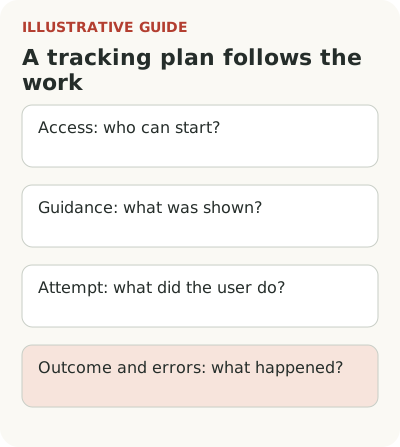
Start with a question for the data
In the first scenario, the team wants to know where a new account stops: configuring roles, submitting, or waiting for an answer. In the second, it wants to know whether experienced users understood the bulk operation, could complete it, and returned to it at the next eligible task. These are different questions. Don't combine them into a generic “activity” metric.
For each question, write down the decision each possible answer would prompt. If people don't get access, check permissions. If they have access but don't notice the feature, consider changing the explanation or message placement. If an attempt ends in an error, fix the operation. Events must distinguish these cases, or a detailed report will still be useless.
Segment's Tracking Plan documentation suggests starting with key business metrics and related actions. The plan describes expected events and properties. Its value is that the team agrees on what data means before a chart appears, rather than inventing the meaning afterward.
Event definitions should support onboarding metrics.
Separate guidance delivery from work outcomes
Guidance events can describe a message shown, explanation opened, tour started, skipped, or completed. They help check who received content and how. Product events should separately confirm route setup, successful request submission, and a decision.
For example, define approval_requested so the team knows whether it means a button click or a request accepted by the server. You can choose different names, but don't give one name two meanings. For success, use a confirmed fact, especially when an asynchronous operation can fail after the window closes.
Don't make seeing a message a condition of the outcome. Some users will find bulk approval themselves. If you count only those who saw guidance, you'll miss real use and get a biased picture. Join explanation delivery and completed work in analysis while keeping their definitions independent.
Give each event context
For the hypothetical approval, you need stable user, account, and operation IDs, event time, and schema version. Choose additional properties to answer the question: role at the time, guidance variant, operation type, training-data flag, and error reason. The full request content isn't needed for this task.
Keep historical context for important conditions. Today's plan doesn't always describe yesterday's access. A current role may have changed too. To compare eligible audiences, the team needs the state in the relevant window or a reliable change history. Substituting current values can rewrite a past launch.
Include the account relationship in the event or through a verified rule. One employee may approve requests for different organizations. In Segment's B2B SaaS specification, trial-related events include account context. The specific schema depends on the system, but choose the unit of work explicitly.
Verified events can support a CPO dashboard.
Check duplicates, delays, and gaps
Two button clicks shouldn't become two successful requests if one object was created. Redelivery of an event doesn't create another outcome either. An engineer should explain which ID distinguishes a real operation and how analytics handles retries. This matters especially on an unstable network.
Client time and processing time can differ. For asynchronous approval, retain an understandable order: request accepted, processed, completed. Document which time drives the report and how long to wait for late data. Otherwise yesterday's values will change without explanation, and the team may think it accidentally broke the launch.
Check the scenario manually from screen to record. Create an eligible test account, complete a successful action, produce the expected error, and retry. Reconcile the number of operations with application data. This doesn't replace full quality assurance, but it catches an obvious substitution of clicks for outcomes before decisions are made.
Assign a schema owner
The product manager owns the meaning of the action and the question, the engineer the source and delivery, and the analyst the suitability of the calculation. Assign one owner to each event so that when a form changes, nobody assumes the old name automatically means the new behavior.
Document schema changes: what changed, from when, and how to compare periods. Don't rename an event for tidier English without checking its consumers. Segments, guidance, reports, and support processes may depend on it. A short dependency list helps prevent a quiet break after an apparently harmless edit.
Remove unnecessary data deliberately. If an event supports no decision, you may not need to collect it. But first check consumers and retention periods. “Collect everything and decide later” increases work and the risk of access to unnecessary information without guaranteeing useful analysis.
For errors, retain a stable reason code, not just on-screen text. Text changes with translation and editing even when the technical problem stays the same. The code helps compare periods; a clear description beside it helps product and support decide what to fix.
For causal assessment, prepare an A/B test plan in advance.
The first version fits in one table
Take one scenario and add rows: access confirmed, guidance shown, attempt started, outcome achieved, error occurred, task repeated. For each row, specify meaning, source, unit, properties, and verification. Not every row needs a separate event: some state may already be stored reliably in the application.
Then ask a colleague to use the table to explain what they would see in the data after a failed submission. If their answer differs from yours, the schema isn't ready. Fix the agreement on meaning first. Build a new chart only after two people understand the same thing about what happened to the user and their request.