To reduce repeat support requests, first choose one type of question and find out what prevents people from completing the task. Compare repeat tickets per eligible audience alongside successful actions and errors: fewer requests alone don't prove improvement.
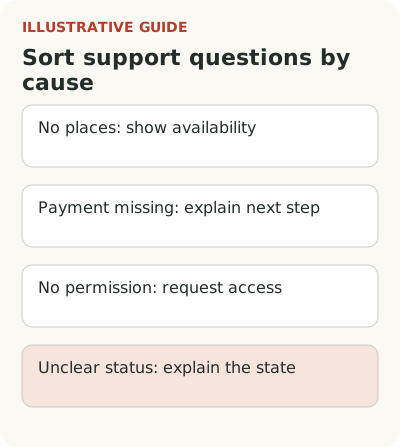
Suppose a service for training centers often receives questions about why a student can't enroll in a group. One ticket category contains several causes: no places remain, payment is missing, the person lacks permission, or they don't understand the application status. A general “how to enroll students” guide is unlikely to resolve all of them. Separate the causes first.
Map one recurring question
Suppose several stores repeatedly ask how to upload inventory. First define the request type: a repeat is a new ticket from the same account about the same issue within 14 days of the first; continuation of one ticket is separate. Agree on the rule before comparing.
| Observation | Possible cause | Check and response |
|---|---|---|
| Question about file columns | Requirements aren't visible before upload | Test understanding of an example next to the form |
| Question after instructions | Answer doesn't match the error | Compare the error code and guidance |
| Error after a valid file | Operation failure | Send a reproducible case to engineering |
| No answer in the knowledge base | Specific scenario isn't covered | Add instructions and retain a support channel |
Count repeat tickets of this type per 100 eligible accounts that made an initial request of this type and for which 14 days have elapsed; separately show the number of accounts with a repeat and the total number of initial requests. A decline may mean less activity or reluctance to contact support, not a solved problem. Review successful uploads, errors, and manual help; without a control, a change doesn't establish the cause.
Sort questions by what blocks the work
Take requests from a bounded period and group them by cause, not just screen topic. “I can't enroll” describes a symptom. “I don't understand what preregistration means” points to an explanation. “The system won't let me enroll when a place is available” may indicate a bug or an incorrect access rule.
Count affected accounts and repeats within one account separately. Ten requests from one administrator and ten independent training centers need different investigation. Retain the period and size of the eligible audience. Questions may increase after a large enrollment drive even if the product is clearer.
In an interview with Hélène Vincent about TeamSupport, support data is discussed as material for addressing customer and product problems. This is one company's experience, not proof of tooltip effects. Take the question back to your own team: what cause sits behind the repeat, and where should it go for a fix?
Choose the guidance format for the question: tour, checklist, or tooltip.
Separate a short answer from detailed instructions
If an administrator doesn't understand a status, put a short explanation next to the status or action. For example, it might say which condition remains unmet and who can meet it. A long article at that point merely makes the person search for the right sentence while uncertainty remains.
Keep the complete process in the knowledge base: possible statuses, how to move to the next one, and what to check in an exception. The tooltip link should lead to the relevant section. Don't send someone to the knowledge base home page to guess keywords. They're already working on a specific task.
Check that the copy matches permissions. Don't tell an employee without access to click a hidden button. They need a route to an administrator or an access request. Guidance that shows an unavailable action adds questions even if it looks thorough. Its usefulness depends on the next available step.
Keep a route to support
When the cause is unclear or an action carries risk, leave a simple way to ask for help. A tooltip can help prepare context: current status, operation type, and a safe identifier. Don't require document contents, passwords, or unnecessary personal data. Support needs context for investigation, not the customer's entire archive.
Don't measure success by the number of people unable to create a ticket after reading an article. Hiding the support button reduces requests neatly and does little to help enroll a student. Alongside question volume, look at task success, errors, and retries. If questions fall while incomplete enrollments rise, investigate why.
Find out whether the request was actually resolved. A closed ticket may mean an agent sent a link, but the administrator never achieved the outcome. For the selected topic, compare the response with a confirmed action and, where appropriate, a short follow-up. This is a qualitative check, not a reason to survey every customer endlessly.
Guidance should appear at the right time: see help at the point of error.
Measure change against an eligible base
Define the measure as requests with a specific cause per eligible account or work operation over a chosen period. The unit depends on the question. For student enrollment, operation frequency may be more useful than total users because workload changes sharply during enrollment.
Keep absolute counts, the share of repeat requests, and staff time. Don't automatically convert freed hours into money saved. The team may use that time for complex cases, but expenses don't necessarily fall. This distinction matters when making a budget case for in-product help.
If a topic becomes less frequent after a new tooltip, check seasonality, the mix of centers, form changes, and agents' work. A simple month-to-month comparison doesn't establish cause. With low volume, examine individual cases and observe the task; the conclusion concerns the mechanism found and observed outcomes, not a guaranteed percentage reduction in requests.
Send recurring causes to the product team
Support shouldn't compensate forever for an unclear rule. Assign someone to review new causes at an agreed interval and decide whether each needs copy, an article, a screen change, or a bug fix. Each cause needs an owner for the next action.
In the hypothetical example, show that no places remain before an enrollment attempt. Explain an unclear status in context. Fix an incorrect payment check. Different solutions don't have to pass through one tool. A tooltip helps when someone lacks knowledge; it doesn't create a place in a full group or repair data.
Knowledge-base content and tooltips change with the product. Name an owner and a review point when statuses, permissions, or the form change. Otherwise old instructions will create new requests, and the team may record them as another case of inattentive users. The source of the problem will be its own copy.
Include repeat questions after a release in the launch plan.
Take one topic to the next review
Choose a recurring question that prevents completion of a specific task. Check the cause in requests and observation, prepare a short on-screen answer and a linked detailed article, and leave a route to support. Before release, fix the baseline and evaluation method; afterward, check work outcomes and new questions.
You can consider Flowtomate for contextual tooltips, checklists, and tours. The team must separately prepare the evidence about request causes, outcome events, and the conclusion about effect. Start with a question users may no longer need to ask because they actually completed the work.