
Guidance for form errors should explain the cause, the state of entered data, and a specific correction. Put the answer where the person can read it and change the field at the same time. If the operation is broken, wording alone isn't enough: first provide a working recovery path.
Start with one error the system can distinguish. A format error needs an example; expired access needs reconnection with the right permissions; an unknown outcome needs an operation check. A generic “Try again” doesn't make a retry safe.
Identify a cause the user can fix
Suppose an email service won't accept a contact file. Some users choose the wrong delimiter, others upload rows without an address, and a third group has expired access to an external source. A generic “Import failed” leaves them equally confused even though their next actions differ.
Check all upload conditions for the first data import. A delimiter needs an example and a preview of recognized columns. Empty addresses need a list of problem rows and a processing rule. Expired access requires reconnection with the right permissions. First distinguish these causes in the product. You can't write precise advice if the system itself doesn't know what happened.
Study support requests and actual attempts. A frequent error may have a simple cause in a field name, while a rare one may lose a lot of work. Prioritize by consequences and the number of eligible users affected. Don't rely only on support-request volume: some people leave silently and never contact support.
Replace a generic error with a specific answer
What happened? What was saved? What should the person do next? For a hypothetical import, the answer might be: “We couldn't find the email column. The file hasn't been added to the list yet. Select the email column in the preview.” This is better than telling someone to read general contact-database documentation.
This hypothetical import form shows what information the product must supply before the copy can be edited.
| Weak message | Working version if the conditions are confirmed | What must work |
|---|---|---|
| “Invalid file” | “We couldn't find the email column. Select it in the preview. Contacts haven't been added yet.” | The preview opens, mapping is saved, and records haven't been applied |
| “Date error” | “Enter the date as 10/31/2026. Your other fields are saved.” | The date alone can be corrected without re-entering the form |
| “Something went wrong” | “The source denied access. Reconnect it with permission to read contacts. Your selected fields are saved.” | The cause is known, the permission really has that name, and reconnection returns to the same step |
| “Retry the import” | “Some rows were added. Open the operation result and retry only the rejected rows.” | Applied and rejected rows are listed, with a safe retry method |
Check every statement about saved data after the error and after a reload. If the system doesn't retain fields, fix persistence first or state the loss honestly. Copy cannot save data by itself. The detailed process for writing guidance starts with these conditions, not a friendly tone.
If the system processed some rows, say so accurately. Otherwise the person may retry the import and create duplicates. If a retry is safe, explain why under the product's actual rules. If the result is unknown, don't promise that nothing changed. Clarifying state matters more than a friendly tone. An empty state after an error must also differ from a new workspace without data.
NN/g's help and documentation guidance ties reactive help to the problem and specific steps. For a short message, that means a focused answer. When choosing another format, compare the jobs of tours, checklists, and tooltips. A long guide can remain available by link, but the main correction shouldn't require finding a paragraph among every import rule.
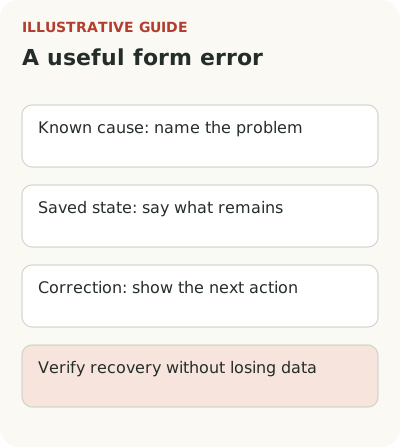
Keep the message visible beside the correction
Show the message beside the field or action that needs correction and connect it to the operation's overall state. A banner at the top of a long form can easily be outside the viewport. A pop-up card can cover the field itself. Placement should allow someone to read the advice and change the data at the same time.
Don't make people remember a sequence before moving to another section. If correction spans several screens, offer short help at each necessary step or keep the instructions accessible. NN/g's contextual help article specifically advises against putting multi-step work on the user's memory and recommends letting people reopen dismissed help.
Check that the message is keyboard-accessible and doesn't depend on mouse hover alone. An important format rule should be visible before an error if the violation is predictable. Guidance after failure helps recovery but doesn't justify hiding a requirement. For example, state the permitted file size beside the file picker in advance.
Trigger help from state, not a pause
A long pause doesn't always mean difficulty. The user may be comparing data in another window, answering a colleague, or choosing the right period. Advice that immediately appears over the form interrupts the work itself. It is more reliable to use a specific state: a known error, missing required value, or explicit request for help.
For a complex operation, you can offer help after another failure without taking control. Let people close the message and keep their entered data. Don't launch the same tour on every repeat of an error if it has already failed to help. A different path is needed: detailed instructions, diagnosis, or support.
Consider the limits of what the guidance knows. If it says “ask your administrator,” the person should understand which administrator and which rights are needed. Don't send connection secrets or ask people to paste them into a conversation for convenience. An example access request can explain the job without exposing keys or user data.
Check recovery and data preservation
The main measure is the share of users with a specific error who then successfully complete the same operation within the chosen window. Specify the unit: person, import attempt, or account. Don't blindly count one person's repeated attempts as independent users, or the hardest cases will receive extra weight.
Also track retry counts, new errors, duplicates, and support requests. Fewer requests don't always mean help worked: people may simply have stopped trying. Tooltip openings show visibility, not recovery. To check data preservation, test partial processing, cancellation, and retry after a break as well as success.
If the message changes, don't attribute the effect of an import fix made by engineers at the same time to the copy. Separate the changes or honestly evaluate them together. With few errors, observe several complete attempts through to a result and state the data's limits. Confidence should follow evidence, even if the team has already fallen in love with the new copy.
Assign an owner to the examples and rules in the guidance. If import starts supporting a different format, old advice can create a new error. Check the text alongside changes to processing and the form. Keep the technical display condition nearby in plain words so an editor knows who the message is for. Otherwise improved wording may still appear in the wrong state, where style won't help.
Take one error and answer three questions: cause, saved state, and available action. Test the answer with someone who doesn't know the system. If the explanation works, you can show contextual guidance through Flowtomate. If the person still can't continue after reading it, the next task is in the product itself.