
To write customer release notes, turn a development task into a clear action: what people can do now, where to find it, and under what conditions it works. Then check the copy as the reader's role. The record of the change should remain accurate after a pop-up announcement closes.
Imagine a time-tracking service adds a check for overlapping entries. Engineers describe the change as “Added range validation with conflict handling.” A project manager wants a different answer: can they now send a report to a customer without checking every row manually? Start with that question.
What changed in the user's action?
Ask the feature owner to finish this sentence: “Previously the user did…, now they can….” “The new validation works now” isn't enough. In the hypothetical example, an employee previously noticed overlaps while reviewing a weekly report; now they receive a warning when saving an entry. The check's timing and the way to correct it changed.
Don't attribute extra work to the feature. If the system only warns, don't write that it “eliminates report errors.” The user may leave a conflict, and another error may have nothing to do with time. More precisely: “When you save, you'll see which entries overlap and can correct them.” That promise can be checked in the interface.
Ask who needs it. An employee cares how to correct an entry; a manager cares about checking before sending; an administrator cares about configuring the rule. One feature can produce several short messages with different actions. Don't join them into a paragraph that is half irrelevant to each audience.
Build release notes from the change, access, and action
Here is a pair for the hypothetical time check. Confirm actual product conditions first; these are illustrative only.
| Internal record | Customer-facing record |
|---|---|
| Added range validation with conflict handling | When you save a time entry, you'll see which other entries overlap it. Open the marked entry and correct the time. The check is available on the Team plan to employees who can edit their own entries; an administrator doesn't need to enable it. It doesn't change previously submitted reports. |
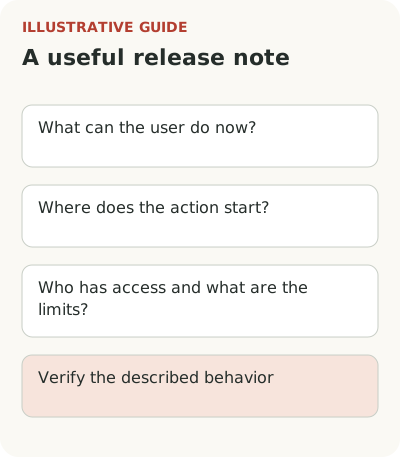
The record has four parts: changed action, starting point, access, and limits. “The check is available” here means only a warning: the text doesn't promise automatic correction or a block on submission. If the real feature behaves differently, change the record too.
For several changes, group records by consequence: a new action, a change to an old one, a bug fix, or a required transition. When retiring a feature, place the deadline and consequences above other news. This structure concerns record accuracy; channel selection is a different task.
The first sentence should work without a “We've updated” heading. For example: “Before sending a weekly report, you can now find time entries that overlap.” Then explain where to open the check, what counts as an overlap, and which entries it doesn't cover. The reader gets the meaning before the details.
This follows TimelyText's release-notes advice: explain the change through the user's work, state the required action, and put details in documentation. This is editorial material from a writing service, so treat its advice as an approach to writing, not measured evidence of increased use.
For a small record, a few connected sentences are usually enough. If access conditions are longer than the description, an administrator may need a separate message or link to the rules. But don't hide the main limitation behind “Learn more”: before clicking, readers must know whether the action is available and whether a colleague must participate.
How should you describe a required change and old data?
An optional capability allows a calm invitation to try it. A change that blocks an old way of working needs a deadline and consequence. If overlaps now prevent report submission, don't describe this only as a helpful check. Say which reports won't send and how to prepare existing entries.
Explain the fate of old data separately. Are previous weeks checked? Will submitted documents change? Must anything be saved again? These questions can seem secondary to an author looking at the new form. Customers need the answers to know whether they can continue work on Monday.
Don't mix a mandatory action with advertising for adjacent improvements. “New colors, faster search, and mandatory report rechecking” is organized around development scope, not user risk. The important change must be visible without reading the entire release. Other news can remain in a separate part of the feed.
How can you test the note with a specific time overlap?
A hypothetical example helps check the copy before publication. An employee records a meeting from 10:00 to 11:00 and project work from 10:30 to noon. On saving, they see the overlap, open the original entry, and choose which time to correct. A short action description is more precise than “Manage your time more effectively.”
The example must match actual product behavior. If the warning appears only after a check is run, don't place it at save time for a cleaner explanation. Have someone who didn't build the feature follow the described path. The error may be in the copy or in the feature itself; the check will reveal it.
A screenshot helps if it shows where to find the new action or understand the result. A full-page image with tiny interface details that readers can't make out doesn't help. The caption should say where to look. If an image contains customer or employee data, prepare a separate safe example before giving it to the editor.
Who confirms the facts and understanding of release notes?
Give the note to someone with the relevant role and ask: what changed, does it affect your work, and what will you do after reading? Don't begin with “Is everything clear?” It's easy to answer yes and end the conversation. A retelling reveals where the reader saw automatic correction instead of a warning or assumed the check was available to everyone.
Agree which information stays in the technical log. Engineers may need task numbers, compatibility details, and method names. There is no need to remove them from every material in pursuit of plain language. Keep the accurate technical source and link it to the short customer-facing record if the audiences need both levels.
Assign a fact owner separately from the writer. An editor can make the explanation clear but shouldn't guess access, the fate of old documents, or how the check works. Before publication, the release owner confirms those conditions. The note also needs review when access expands: old copy doesn't become eternal truth because it was approved once.
After publication, look beyond clicks. For the hypothetical release, it is more useful to know how many eligible reports were checked before sending and how many conflicts remained without a clear exit. Choose a window covering the weekly cycle. If “Why won't the report send?” requests rise after the note, revisit the explanation of the mandatory rule.
Take one technical record and ask a reader to name the action, access, and limitation. After checking it, place a permanent version, for example in the Flowtomate changelog. Short announcement examples for three channels can help distribute the news; the relationship between the record and use is covered in feature adoption.