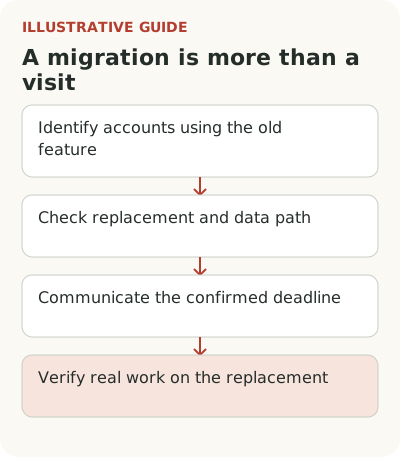
Removing a feature requires a customer transition plan: who depends on the old method, what replaces it, what happens to data and how to verify the outcome before shutdown. The announcement should state a confirmed deadline and consequences. Opening the new section alone doesn't complete a migration.
Imagine a field service management product retires old service report templates and offers a new document editor. It has more settings, but some companies use the old format to exchange reports with their customers' accounting teams. “Move to the new editor” doesn't answer their main questions: will the next report be accepted, and will links to past work remain?
Which accounts depend on the feature being removed?
Identify affected accounts from working actions and saved objects. Last sign-in doesn't reveal every dependency. A company may print a report monthly, keep a mandatory template or generate documents through an integration. No recent click doesn't mean the feature can be removed without consequences.
List workflow variants: manual creation, bulk issuance, sending a link, exporting to an accounting system and reprinting an old document. You don't have to retain each method forever, but you need to know what changes for the customer. Otherwise the team may declare the replacement complete after testing only the simplest document in the new editor.
State the reason for shutdown at an appropriate level: duplicate methods, an unsupported mechanism, changed requirements or excessive maintenance cost. Don't present lost capability as an improvement for every customer. Some users really do face extra work. Acknowledging that permits a concrete transition discussion without advertising language.
Check that the replacement produces a usable outcome
Map old and new workflows. In the hypothetical service, a report needs required details, signatures, a list of work and a format the customer can receive. The existence of a new editor doesn't prove equivalence. Ask a representative of an affected group to go through to a finished document and check it outside the service where the report is accepted.
Name missing capabilities. A manual template may suit one customer, another needs development, and a third needs export and a process change. These options have different costs and must be clear before shutdown. An account isn't migrated just because someone opened the new section once.
The GitLab deprecations register provides an example of a precise structure: entries identify the announcement, removal version, affected mechanism and transition actions. Some changes depend on installation and use. For the report service, the useful pattern is “what disappears, whom it affects, what replaces it and what to do,” not a copy of someone else's deadlines.
Choose a shutdown date around the customer's cycle
Don't assign the same thirty days to every feature. A customer may need accounting approval for a template, an integration change or the next monthly document run. The deadline should allow a real opportunity to complete that cycle. If an external constraint leaves little time, say so and separately investigate high-risk groups.
Separate the date when creation ends from the fate of old materials. You might prevent new reports in the old editor while retaining viewing and export of old ones, if the product actually supports that. Don't combine those events into “the feature will be unavailable.” Users need to know whether they'll lose access to completed work.
Describe exceptions and who decides them. Endless individual extensions turn shutdown into permanent maintenance of two systems. But automatically cutting off a customer with an unfulfilled obligation can be costly too. An exception needs a reason, a bounded period and a concrete action that ends it.
Assemble the shutdown announcement and check migration
A working announcement structure answers several precise questions:
| Announcement part | What to state |
|---|---|
| Change | Which report creation method ends and why |
| Affected work | Which accounts, templates and operations change |
| Confirmed deadline | Date and time creation ends; separate history access deadline if different |
| Next action | Transfer the used template and verify a usable report in the new editor |
| Data and limits | What remains, how to export history and which old fields won't transfer |
| Help | How to report an unsupported case and who decides exceptions |
This is a structure to fill with release facts, not a ready notification with an invented date. If the deadline or history's fate is unknown, the team must decide it first. Under the release note guidelines, a material condition shouldn't be hidden behind a general link.
In the migration register, record account states: “dependency confirmed,” “template transferred,” “working report accepted,” “history available” and “unresolved gap.” Completion requires an accepted report and verified history. The absence of clicks on the old button doesn't replace that evidence.
The first notice should explain the change, date, affected work and transition path. Reminders depend on state: template transferred, document checked, work started in the new editor or nothing done yet. Repeating one message to everyone is easier, but migrated customers get noise and others don't see their particular barrier.
Email reaches the owner outside the service, a warning in the old editor meets an actual attempt, and permanent instructions retain details. Support needs the same version of the conditions. If email promises access through month-end but the product closes creation earlier, the customer faces a broken promise whatever the technical cause.
Provide a path for people without transfer permissions. A dispatcher may print reports but not change company templates. They need an explanation and a way to pass the task to an administrator. Calling them “not migrated” makes little sense: the product requires action by someone else.
When is an account migrated?
Before shutdown, check how many eligible accounts created and had a usable document accepted using the new method. Count those who no longer need the feature separately from those who couldn't move. Inactivity mixes the two groups, so important dependencies require direct confirmation or conversation.
Transferred saved materials need a separate integrity check. Compare object counts, required fields, relationships and file access. The same number of templates doesn't prove formulas or department links survived. Choose several different working examples and check the outcome with someone who knows the document requirements.
Don't remove source materials immediately after a new page opens successfully. Define retention and access in advance, considering product and customer obligations. If export is the only way to preserve history, check completeness and usability before shutdown. An archive that downloads but doesn't open in the required process doesn't complete migration.
A return plan must account for data created after transition. If the old editor can't understand it, simply restoring the interface won't restore the old work. Prepare a way to stop new operations, preserve materials and fix the error. Don't promise instant rollback without checking that relationship.
Test one working document's entire migration before confirming account completion. The old-to-new path map explains changes, while the customer team readiness card keeps deadlines and limits consistent across answers. The broader approach to adopting a new method helps here too, but readiness is determined by continued work after shutdown.