An AI onboarding assistant can help when a user's question depends on context and one instruction can't answer it. If someone is looking for a button or the sequence for a known task, first check the screen, a tooltip, or a short tour. Choose the format based on why they stopped. Adding a chat doesn't itself make it easier to start work.
Choosing between an assistant, a short tour, and a plain explanation is easier once you know what the user lacks: knowledge of the next step, an answer to a question, or the ability to act. These are different tasks. One format is unlikely to cover them all.
What problem should an AI assistant solve?
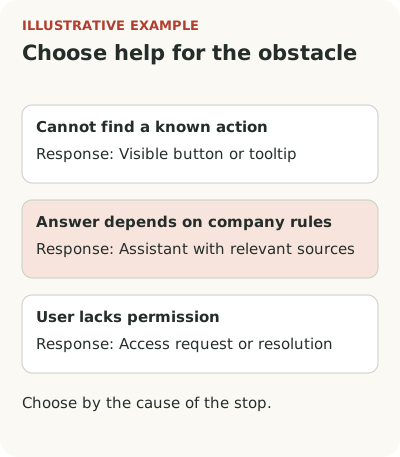
Suppose a company sells a procurement approval service. A new employee opens the workspace, sees a list of requests, and wants to request a laptop. They don't know where to create a request. A visible button, clear empty state, or tooltip next to the action is enough. A conversation with AI would only add steps.
The next user finds the form but doesn't know which purchase category to choose. The answer depends on their company's rules. If an assistant can access the relevant instructions, show the basis for its answer, and honestly report missing data, a conversation may help. Without those conditions it risks confidently recommending an unsuitable option.
A third employee filled everything out but can't submit because they lack permission. Neither a tour nor clever copy will grant it. They need an explanation of the restriction and an available route to someone who can remove it. Start with this distinction. Otherwise the team will compare help formats that solve different problems.
Choose an AI chat, product tour, or tooltip
Use this matrix for an initial choice. It asks questions about the scenario; it doesn't prove one tool is superior.
| Where the person stopped | Check first | When the format fits |
|---|---|---|
| Can't find a known action | Screen and contextual tooltip | They need to know where to start |
| Doesn't know the sequence | A tour of one task | Steps are available now and lead to an outcome |
| Can't finish setup in one sitting | Checklist with saved states | They need to resume after a pause |
| Asks about their company's rules | Assistant with current sources | The answer depends on context it is permitted to access |
| Hits an error or lacks permission | Fix the operation or access | An explanation alone doesn't enable the action |
Tour, checklist, or tooltip explains the differences among the three conventional guidance formats. Choose the work first, then decide whether it needs a conversation.
A short scenario suits a repeatable action with a clear sequence. A user needs to upload a file, check field mapping, and confirm the import. Each step can connect to product state and be explained in place. Don't make someone repeat to an assistant what the interface already knows.
This approach has limits. If import rules differ across companies, one linear instruction quickly accumulates exceptions. Check whether you can remove some branching from the product itself, provide separate scenarios for different tasks, or add documentation. Chat is one option. It doesn't have to be first.
If people close existing guidance, first investigate why they dismiss a product tour. Replacing an instruction window with a chat window may preserve the original reason for dismissal.
Sometimes no guidance is needed. If people find the action themselves after a button label is fixed, an extra layer only takes space. That is a good outcome: less content to maintain and fewer reasons to interrupt the user.
When chat can help more than prepared instructions
Conversation makes sense when the question depends on context: what data to prepare, how two modes differ, or how to fix a specific error. But first decide what the assistant is permitted to see and how current its answers can be. Otherwise onboarding will drift away from the product.
In an account of building Lucius AI, the author links early departures not only to missing instructions but also to distrust of AI behavior. That's one creator's observation, not a rule for every SaaS product. It suggests a question for your scenario: does the person not know what to click, or aren't they ready to trust the system with their task?
Take several real support difficulties for a test. Have the assistant answer using only data that will actually be available in the product. Check whether the answer lets someone continue working, not how polished it sounds. Also ask a question the knowledge base can't answer. A way to acknowledge that limit matters as much as a successful answer.
Count the team's work after launch too. A tooltip needs current copy and a working target on the page. An assistant also needs maintained knowledge sources, access rules, and ways to check answers. If the product changes weekly, old instructions may enter a new conversation in a confident tone. Assign someone to monitor such changes and define how to fix a wrong answer. For an infrequent question, short, current documentation may be simpler for both user and team. The promise that “AI will explain everything now” doesn't remove that work.
Before choosing a tool, separate changes a product manager can make without development from installation, data transfer, and constraints an engineer must check.
Combine formats in one working scenario
In the hypothetical procurement service, the start might look like this: an empty state offers to create a request, a short explanation helps choose its type, and chat opens only for a question about company rules. The user decides whether they need more help. The request remains central.
Don't force every question through chat. Someone who needs a direct link to settings should get it. If an answer requires a data change, separate explanation from action: showing, preparing a draft, and submitting are different states. Name them explicitly.
Calix Leigh-Reign emphasizes clarity of work state in an account of an AI feature experience: users need to know whether they're seeing a suggestion, a draft, or an action already performed. The same idea applies to onboarding. Guidance should explain what happened and what the person can do next.
How to test an assistant's usefulness in onboarding
If conversations rise after an assistant launches, there isn't much reason to celebrate yet. People may be asking follow-up questions because the first answer is unclear. If support requests fall, check whether users reach an outcome. They may simply have stopped trying.
For one scenario, define the starting audience: for example, employees who can create a request and have started doing so. See how many submit a valid request, where they stop, and how often they switch help methods. Count errors and manual intervention separately. To compare variants, keep the task consistent and account for user differences; other conditions may also have changed before and after release.
If users like an AI result but don't return to it, that calls for a separate check of repeat use of an AI feature. A help assistant and an AI feature that performs customer work need different outcome definitions.
You can start without a major rebuild. Find one frequent question, check its cause, and choose the smallest way to help. If someone needs to follow a known interface path, consider Flowtomate tours and tooltips. If the task requires analyzing data, an ordinary tooltip won't do that AI work.