
Check an onboarding data import before the “Upload” button appears: is there a suitable file or source, permission to read the data, and a clear mapping rule? Then confirm not only technical completion but also that the first upload is usable for the work.
If someone is waiting for an administrator, form guidance won't grant them permission. Separate preparation of the material, access, and processing. For each state show what is saved, who acts next, and how to continue without starting over.
Separate a missing file, missing rights, and an operation error
Suppose a service reconciles payments with orders. Its first report needs data from a store and a payment system. A manager signs up but cannot issue an access key. Analytics show an exit on the connection screen, although interface confusion isn't the cause. Someone else must act next.
Separate causes of stopping: missing material, missing authority, an unclear requirement, a failed operation, or a result that needs review. Record confirmation for each cause. If a user merely closed the screen, the cause is still unknown. Start with diagnosing a stop after signup. Don't assign a reason from one event, even if the team is sure “everyone fears integrations.”
In Automate & Augment's discussion of a stalled trial, the author recommends separating first-launch steps and naming an owner for each in advance. This is the author's practical position, not measured effectiveness research. For connection work, the useful distinction is between what the customer must do and what help the team may provide.
Prepare an access request without sharing secrets
On the connection screen, list the required permissions, who usually grants them, and why the product uses the access. Permission names must match the actual source system. If its interface changes, stale instructions become another reason to stop. Assign someone to check them when the connection changes.
Prepare an administrator request without keys or user data. The person can explain the task, required access scope, and expected result. Don't suggest sending a secret to support chat to speed up setup. Help with the sequence and handling credentials are different things; don't combine them carelessly.
Show the waiting state. Users need to know what is already saved and how to continue after access is granted. If access arrives several days later, signing back in shouldn't erase the selected source or restart the questionnaire. For an external dependency, provide a distinct next step the person can actually take now. In the SaaS setup sequence, that dependency belongs before the work that needs it.
Define conditions for a successful first upload
If file upload is available, show the accepted format, an example, and a preview. Separate field mapping from final application. The user should see which columns were recognized, what happens to empty values, and how the system handles matches. Don't hide duplicate rules in a long guide after upload.
Write down hypothetical first-upload conditions for reconciling payments with orders before launching the wizard.
| Check | Readiness condition | What to show on failure |
|---|---|---|
| File | Format, size, and required columns meet actual requirements | An example and the specific difference, not “invalid file” |
| Source | Both datasets cover the same agreed period | Which period or source is missing |
| Permissions | The user may upload data and the connection has the required read access | The permission name and route to an administrator |
| Mapping | Order ID, amount, and currency are checked in preview | Fields requiring a human decision |
| Retry | Handling of matches and partial success is known | What was already saved and which part can be retried |
| First result | The report uses both sources and exceptions are visible | Why “connected” doesn't yet mean “ready to reconcile” |
For a practice check, use one limited period if both sources are complete for it. A random subset of orders alongside all payments creates false discrepancies. After import, compare several rows with the source and check completeness for the period; this tests conditions, not a promise that any report is accurate.
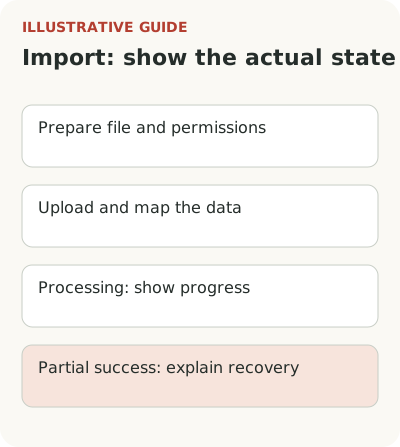
Plan for partial success. “There are errors” isn't enough if some rows have already entered the working database. State what was saved, what was rejected, and how to retry the failed part safely. Whether cancellation is possible depends on the product, but explain its presence or absence before an action that is hard to undo.
A small set of real data is sometimes sufficient for a first result. Offer it only when it can test useful work without distorting the conclusion. For payment reconciliation, a random half of orders can give a false picture of discrepancies. A limited example needs clear boundaries, not a promise of a complete financial result.
Show processing, partial success, and recovery
After connection, the system may load history and check access. Show what is happening, what actions are available, and when user intervention is needed. If there is no exact timeframe, don't invent one. A clear status is more useful than an unsupported promise that “everything will be ready in a minute.”
NN/g's empty-state guidance recommends distinguishing missing data from ongoing processing instead of reporting “no records” before loading finishes. For an integration, this helps avoid repeat connections and unnecessary requests. Users should learn the state from the product, not by refreshing the page.
For each failure, prepare a message with an available correction: retry, check permissions, choose another method, or contact support with a safe operation identifier. Don't require the imported file's contents when technical details are enough to diagnose the problem. A useful error limits unnecessary data sharing while giving the team enough context.
Check whether the data supports the first result
The funnel needs separate stages: source chosen, rights obtained, connection checked, data usable, first report created. Time to value explains how to count the overall duration. A window from signup shows the customer's whole wait. A window from access readiness shows the operation's quality. Mixing them may blame the interface for an administrator's delay or hide a long customer start.
Specify the account unit and retry rules. One customer may try several connections, and support employees may run diagnostics on their behalf. Distinguish those events. Otherwise a report may show increased activity created by support even though independent setup hasn't become easier. Count the success share among those who can actually use the selected method.
Check quality after connection: completeness for the required period, mapping errors, repeat synchronization, and the customer's ability to obtain the next result without your help. A technical “connected” status doesn't prove that the data supports a decision. In the financial example, a meaning check is especially important because an attractive report can hide a missing source.
Record how the customer will know they are ready for the next step. If a source is connected but data is still being checked, the status should name that check. If manual reconciliation is required, explain who performs it and which information is available for review. The distinction matters especially with multiple sources: connecting the first doesn't mean the combined report is ready. A premature create-result button merely moves the error elsewhere and makes it harder to understand.
Start with one connection and walk through it as someone without administrative rights. Record every point requiring another participant. If the path needs an administrator, say so directly. Guidance can explain an access request; it cannot grant the customer's permissions.