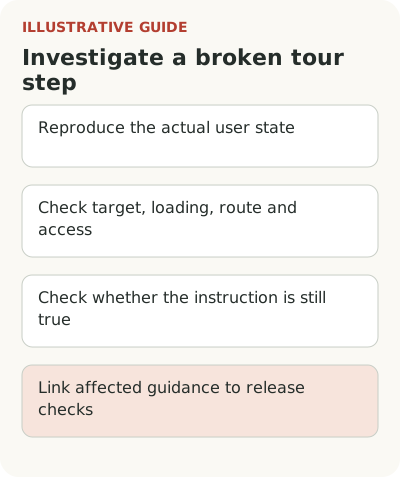
A product tour can stop working after a release because its target, loading sequence, route, or role-based access has changed. Start with the specific broken step and the user's state. Then check the instruction itself: a button that the tour can still find may now do something different.
Include tours in the process for changing the task they support. Each needs an owner, clear conditions, and a short post-release check. You do not need a separate process for every piece of copy. You need to know which instructions depend on the interface you are changing.
If nobody has reviewed the guidance library yet, start with an onboarding audit. Choosing between a tour, checklist, and tooltip also changes the list of interface dependencies.
Keep an inventory of workflows, not just tours
Suppose the team moves product import from the main menu into the catalog section. That is one product task, but several pieces of guidance may depend on it: a new-user tour, an empty-catalog hint, a checklist link, and an announcement from an earlier release. Checking only the tour leaves other instructions pointing to the old route.
For each important workflow, record its goal, starting page, audience, prerequisites, and owner. Note whether it requires existing data, administrator permissions, or an enabled feature. You do not need a description of every pixel. The record should help you find affected instructions when the product changes.
At release planning, ask a simple question: are any labels, locations, access conditions, or action sequences changing? If so, open the related guidance. That connection saves a search after a customer reports a problem. If nobody maintains the inventory, reduce it to the materials people actually use and assign owners to those that remain.
For a temporary announcement, record the condition that ends its display. Once users have adopted the feature or the transition period has ended, the old message may only get in their way. For a lasting instruction, name the change that triggers a review: a revised form, permission, or route to the result. This distinction also helps during handoff. A new owner can see what needs updating and what should be retired. If several workflows use the same material, find those connections first. Removing an old announcement should not break an instruction that people still need.
Find out why a step is missing or pointing to the wrong place
Investigate the symptom before editing the copy. For an illustrative web product, the first checks might look like this:
| Symptom | Possible cause | What to check |
|---|---|---|
| The tour no longer starts | Its first target is missing | The page, role, and first step's target |
| An administrator sees the step but an employee does not | Access to the element differs | Display conditions and permissions under both roles |
| It works on a fast load but fails on a slow one | The element appears after the check | The actual loading sequence and what happens when waiting ends |
| Guidance stays on the previous screen | The route or navigation order changed | The screen before and after the user's action |
| A menu or card covers the button | Layering or scrolling changed | Its position at the relevant width and after scrolling |
| Every target is found, but the instruction is wrong | The command's behavior changed | The actual outcome and the accuracy of the promise |
These are possible causes to investigate, not a ranking of how often they occur. Reproduce your case to confirm it.
A hint can successfully find a button while explaining its old behavior. Perhaps the command used to save a draft and now sends the data immediately. A target-existence check will pass, yet the instruction remains dangerously inaccurate. Match the copy to the action's actual result.
The reverse can happen too: the explanation is still correct, but a layout change broke the target. In its guide to product tour failures, Kompassify lists selector changes, routes, loading states, and access conditions. It sells this kind of tool. Use the article as a list of technical cases, not as evidence of their frequency across all SaaS products.
Intercom's Product Tours troubleshooting documentation separately describes target-finding problems and cases that its issue report does not capture. That describes one particular tool. For your solution, check which failures it reports and which require reproduction. One overall completion rate may not be enough.
The useful question for the product manager is: what should the person see, and why is that not happening? One case needs a copy update; another needs an engineer. Mixing the causes leads the team to rewrite the same step repeatedly when it cannot find the target at all.
Check selectors, loading, and access with an engineer
In an illustrative import flow, a hint targets the third button in a toolbar. Adding another button changes the order, so the tour points somewhere else. That dependency is fragile by design. Agree on a way to identify the element by its purpose that can survive ordinary visual changes.
The specific approach depends on the tool and application architecture. Do not promise that any editor can automatically survive every interface change. Ask an engineer to check what the current target relies on, how the tour behaves between screens, and what happens while data is still loading.
Separate changes a product manager can make without engineering from changes to the application. A scenario editor may let someone update copy; it does not necessarily fix a fragile identifier in the host interface.
Waiting also needs a defined outcome. If a role cannot access the target, waiting forever will not help. If the element appears after a load, giving up too early interrupts a valid workflow. Distinguish those cases and agree on failure behavior: explain the restriction, offer the next available action, or end the guidance without falsely reporting success.
Test the states affected by the release
You do not need to reread the entire library manually after every release. Start with the connections in the workflow inventory. For the import move, check entry from the checklist, the upload path itself, the empty-catalog hint, and the state after products have been added. Let the change determine the tests instead of repeatedly using one convenient account.
Test the roles and conditions that affect visibility. An administrator may see a settings button that an employee cannot. An existing customer has already added data, while a new account still has an empty screen. If both groups need the scenario, testing one is not enough. If only one needs it, make sure the other does not receive it.
Check language, narrow screens, and slow loading where the release affects those conditions. “Test everything” is not a useful instruction by itself. A short list of specific actions is easier to carry out and assess. For each failure, record the state, step, and expected result.
For changes to menus, focus, or card position, use the product tour accessibility matrix. An element can exist in the document and still be unavailable to the person.
Do not count a skipped step as successful learning
If a tool ends a tour after failing to find an element, the overall completion rate may still look healthy. The user has not performed the important action. Check the technical outcome of the tour separately from the result in the product, such as successfully importing valid data.
Where you can observe stop reasons, distinguish user dismissal, a missing element, an action error, and completion. If the current analytics cannot separate them, do not infer technical reliability from completion alone. Use the checks available and state the measurement limit.
After release, examine the affected scenario for the relevant audience. Changes in support requests or target actions can suggest where to look, but they will not establish the cause by themselves. Customer mix and traffic change too. Compare the signal with reproduced behavior and the substance of support conversations before claiming an effect from the release.
A scenario also needs a reason to retire it. If the old route no longer exists or the guidance has lost its purpose, turn the material off after checking its dependencies. Keeping it active because the team once spent time creating it does not help users. Start with the next interface change: find every instruction that depends on it and make those checks part of the release task.