A user onboarding audit checks one path from entry to a usable result, including errors, permissions, and return after a pause. The output should be a list of confirmed obstacles with evidence, an owner, and a check for the fix. “Inconvenient” without a specific state gives the team little to act on.
Start with a real job and a safe new account. Compare your own walkthrough with data and users' attempts. Then decide where to fix the product, where to explain an action, and whether a separate tool is needed.
Set audit boundaries and a result criterion
Suppose a B2B service helps plan shifts. New accounts create teams but rarely publish a first usable schedule. The team is considering a guidance tool. Start by defining usability: employees are assigned without known conflicts, the responsible person has checked the result, and participants can see it. A saved empty grid doesn't meet those conditions.
Limit the audit to one audience and job. Setting up a new company differs from an employee entering through an invitation, and first publication differs from changing a finished schedule. A generic “all newcomers” path mixes problems. Choose one with enough observations and a clear cost of stopping for the customer.
Record eligibility conditions: plan, role, starting data, team size, and entry method. A user without publication rights shouldn't count as a failure at the last step. If a result combines several people's actions, count the account and study handoffs separately. This avoids the false hope that training copy can fix someone else's permissions.
Walk through the checklist with a new account
Create a safe new account and complete the journey with materials a newcomer actually has. Don't substitute product-employee knowledge. If instructions require a file nobody named in advance, record it as a dependency. If the system doesn't explain why a schedule can't be published, save the exact state and message.
This working checklist is for the hypothetical shift service. In each row record “passed,” “failed,” or “not checked,” with a link to safe evidence. An unchecked condition isn't a pass.
| Auditor check | Pass criterion | Evidence in the report |
|---|---|---|
| Enter through a new registration | The required first step is available; the promise before entry doesn't change after the fact | Entry path and first state |
| Start with a newcomer's materials | Employee and shift requirements are known before entry | List of starting materials and missing data |
| Try another role | Unavailable publication is explained and an allowed next step exists | Role, restriction, and access-request path |
| Make a data error | Cause and correction are clear; entered data isn't lost without warning | Error and retry outcome |
| Close help and return | The form is available, draft saved, and help can be found again | State after closing and signing in again |
| Publish and open as a participant | The schedule is usable and visible to the required role | Saved result and recipient check |
Interrupt the work halfway and return. Check data retention, the next step, direct-link entry, and another role's actions. Onboarding should withstand an ordinary working day where people are interrupted and colleagues don't respond immediately. An uninterrupted walkthrough by the journey's author tests only the most convenient case, not the whole user path.
Check a narrow screen, keyboard use, errors, and loading. A tooltip shouldn't cover a field, and a closed tour shouldn't block the form. NN/g's contextual help guidance provides reasons to check timing, reopening, and connection to the task. These are design principles; applying them doesn't yet prove your journey's result. One walkthrough doesn't establish accessibility of the whole product either.
Confirm findings with observation and events
Build a short funnel of confirmed states: team created, employees added, shifts filled, conflicts checked, schedule published. Name the window and source for each event. Don't include optional steps as mandatory transitions, or successful alternative paths will look like losses.
If data shows a drop after signup, use diagnosis of the stopping point. Then study people who stopped at the chosen transition. Ask them to show their last attempt and explain expectations. Analytics shows where an action disappears; conversation and observation help explain why. Don't treat your own successful walkthrough as proof that someone else's difficulty didn't exist. You already know things a new customer doesn't.
In the Participation Studio case study, simplifying onboarding didn't explain the activation problem until research revealed a mismatch with users' jobs. The source describes one project without a universal effect estimate. It reminds an auditor that a short sequence can still lead people somewhere they don't need to go.
Record problems and assign owners
Separate causes by the way they need to be solved. An unclear action name may need copy changes. A missed next step may need a checklist or contextual tooltip. Compare the jobs of tours, checklists, and tooltips when choosing help. An incorrect shift calculation needs a logic fix. Missing permissions need a different available path and administrator involvement. Don't put every cause into a future tour: that makes a purchase easier to document but a result harder to obtain.
Keep a short card for each finding. A hypothetical example: “A planner opened the schedule without publication rights; the button was active and returned a generic error. Reproduced with a new role; impact: publication is impossible for that role; the cause needs an access-model check. Owner: access team. Proposed fix: explain the restriction and provide a request to the workspace owner. Check: the user finds an allowed next step without expanding publication rights.” This separates the observation from an unproven cause.
Prioritize by consequence: data loss and incorrect access first, inability to finish the task next, then extra actions and copy. If the scale is unknown, say so. Unknown reach doesn't turn a reproducible failure into a minor issue. For each card keep the starting state, proposed change, owner, and repeat-walkthrough criterion.
Name an owner for each change. Who updates content after a release, checks the role and screen, and owns outdated instructions? Help depends on the product interface and states. Assign a check for tour preservation after releases before buying. If a form changes and nobody checks the tour, the tool starts teaching a process that no longer exists. Estimate this cost before purchase.
Check whether a smaller change can solve the problem. One clear button and a correct error message can be more useful than a sequence of cards. This isn't an argument against a tool. It is a way to avoid buying complexity before the team has tried a simple fix in the underlying interface.
Test the solution on the original journey
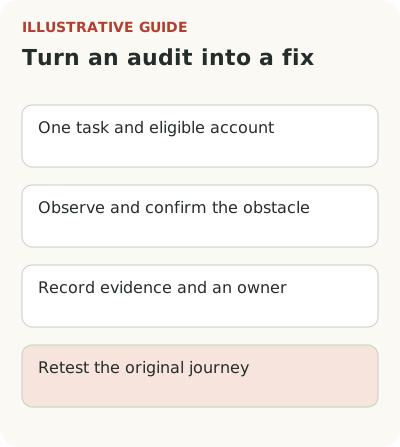
Prepare a short trial task: a specific role, starting state, action, closing help, and return. Check behavior with a missing element, another screen width, and changed permissions. Establish what data is needed for installation, who installs the solution, and what the team must do to maintain it. A full build-or-buy comparison makes sense after this diagnosis. Don't treat a demonstration in someone else's environment as proof of compatibility.
Choose a benefit criterion in advance: the share of eligible accounts that publish a usable schedule within a set window, and no new errors. Treat tour completion and tooltip openings as diagnostics. PostHog's activation guide connects measurement to behavior that reflects value; your event should be equally explicit in meaning.
Separately assess the editor's and product owner's work: can they quickly find the active journey, understand its conditions, and check a change before people see it? Maintenance cost includes not only initial creation but every interface change. Record acceptable limitations instead of assuming the team will work them out after payment.
Preserve the original journey version and test conditions before changes. They will help distinguish new guidance from accompanying product fixes and explain honestly what the team evaluated. Without them the comparison quickly loses meaning.
End the audit with one testable statement: whom the chosen format will help, at which step, and how. If you've found a suitable task, consider Flowtomate tours and contextual tooltips. Evaluate them on your own working path. If there is no diagnosis yet, the next useful use of time is observing a user, not another demo.