
Start onboarding a returning user by restoring their previous work: what remains, what's available and which mandatory change prevents them from continuing. Then offer a relevant new feature. This path is for people who have already worked in the product; an unfinished initial setup needs a different route.
Imagine a small hotel owner uses an email service before each season. They haven't signed in since spring and return to their guest list in fall. Meanwhile, the team updated the editor, added send scheduling and changed domain verification rules. The owner needs to know whether they can send an offer to past guests, not how much development the team completed.
Who returned: the previous operator or a new employee?
First understand the normal work cycle. Six months without a sign-in may be normal for a seasonal hotel and unusual for a daily sales team. One “inactive” threshold would give both accounts the same message, even though they return with different expectations. Use available information about the task, not just the last session date.
Identify the person within the account too. The previous owner may have handed work to a new administrator. The account is old, but the person is seeing the service for the first time. If reliable data is missing, offer a choice: continue previous work or learn the main workflow. Don't make the person prove how experienced they are to the system.
Don't begin by asking “why did you leave?” when the return task is clear. A separate survey may be useful, but it shouldn't block access to work. First help check the campaign's state. Asking about the break makes sense when the team is ready to use the answer and the user can decline.
What remains of the account's previous work?
Show what remains: contacts, drafts, sent campaigns, current plan and important restrictions. The person needs to know whether materials are intact and which actions are available now. Don't make a general promise that data was preserved; show the confirmed state of that account.
For the hypothetical hotel, domain verification is the first question. If sending is impossible without it, explain the requirement and solution path before offering the new editor. If the administrator can't configure it alone, name who is needed and what information to pass on. Otherwise the user spends time on an email that cannot be sent.
Old drafts need a separate check. If the new editor opens them differently, warn before conversion and explain available options. Show a safe preview if available. When a change is irreversible, don't hide that property in a general seasonal welcome: the user is deciding about their past work.
Separate mandatory changes, new features and restoration
For the hypothetical hotel owner, the return sequence looks like this:
| Moment | What to show | What the person does | When to move on |
|---|---|---|---|
| After sign-in | Old drafts, list state and current access | Selects a past campaign or new task | The work they intend to continue is found |
| Before preparing a send | Domain verification requirement and current status | Completes setup or hands it to an administrator | Domain ready; a draft can be saved while waiting |
| In the editor | Only the changed path for a familiar action | Opens, checks and saves a test version | Content restored without a real send |
| After restoration | Voluntary scheduling offer | Examines the feature if needed for the season | The person decides to use or skip it |
Don't require scheduling to restore access to a draft. Unfinished first onboarding starts from a different state: there has been no previous working outcome. Here, guidance must respect past experience.
Separate changes required to continue, useful for the chosen task, and everything else. The hotel owner needs the domain rule, then the new way to schedule a seasonal email. Expanded reports for other channels can stay in the changelog. This order follows work dependencies, not an editorial judgment about the quarter's “major releases.”
Don't equate absence with ignorance. The person may have read a release email or heard from a colleague. Offer a short overview with a way to skip familiar information. A tooltip beside the action can explain the new location of an old button without requiring advance reading.
A Chameleon article on redesigns discusses transition stages and help at the point of change. Applying that approach to returning after a break is an editorial inference, not an experiment with seasonal hotels described in the source. Test it in your own return workflow.
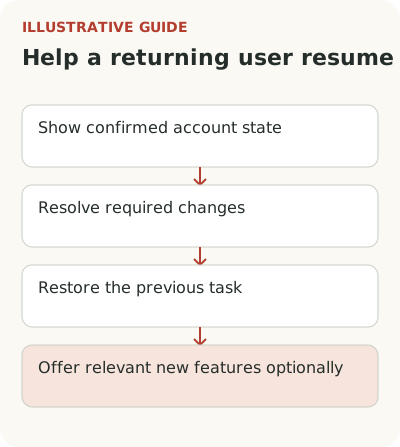
Continue the task without a mandatory tour of new features
Instead of requiring a tour of the entire updated editor, offer to restore a specific draft, check formatting and save a test version. Don't start a real send without a clear decision by the person. Returning after a break is a poor moment for unexpected consequences or automatic selection of an old recipient list.
If there's no current draft, help start a new campaign. Old templates and contacts won't necessarily suit the current season. Guidance can remind the person to check the list and sending conditions, but it shouldn't pretend to perform a legal or technical check the product doesn't provide. The promise of help must match the actual action.
Allow people to open details as needed. Someone who quickly understands the new menu should be able to continue without delay. Someone who forgot setup needs short help with a clear return point. Neither needs the same route through every feature added over six months. The workflow should respect their time.
Measure return against the work cycle
For the seasonal service, signing in after an email is only contact. Choose an outcome: the user prepared a usable campaign and could send it once conditions were met. The observation window should reflect seasonal preparation, not an arbitrary day. Separately examine people blocked by domain, permissions, data state or plan.
If email prompted the return, check that its promise matches the first screen. An email about planning a seasonal campaign should lead to that workflow while accounting for mandatory domain setup. A general home page with five new sections undoes the preparation. Sometimes it's enough to preserve the destination after sign-in and clearly show the missing step.
Also consider when the old task no longer exists. The hotel may have changed how it works with guests or handed email to a contractor. Let the person update their intent instead of continuing the old reminder sequence. A useful return starts with the current task, even if it can't be inferred from past account actions.
Define repeat action by the work cycle too. If the owner sends campaigns before two seasons, no second email within a week doesn't mean the return failed. Compare similar accounts in a similar period. Historical growth after a new welcome could coincide with the start of a season; causality requires a more reliable comparison.
Test return in an old account: mandatory conditions first, restored draft second and new feature last. The B2B team onboarding guide helps separate owner and administrator actions. For a changed interface, prepare a map of old and new paths, and keep the new-feature tour voluntary.